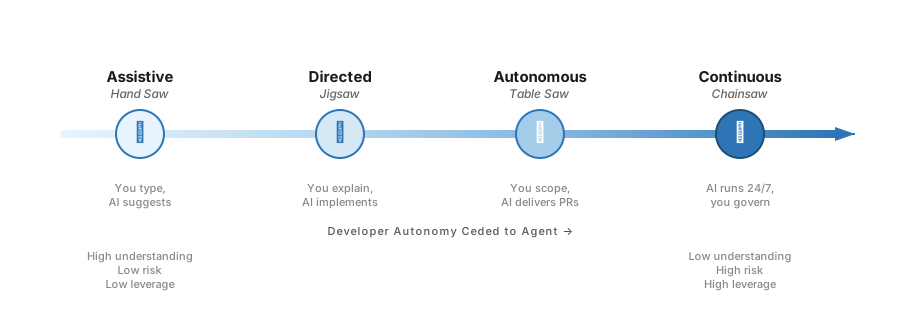
I often liken different modes of working with AI to power tools. A hand saw, a jigsaw, a table saw, and a chainsaw can all cut wood — but you wouldn’t use a chainsaw to build a dovetail joint, and you wouldn’t use a hand saw to clear a forest. The same intuition applies to AI-assisted development, and I think the industry is just now starting to develop a shared language for it.
Full disclosure: I work on GitHub Copilot, so take my enthusiasm with appropriate salt. That said, this framework isn’t about any particular tool — it’s about the patterns I’ve found working across all of them.
Inner Loop, Outer Loop, and Everything In Between
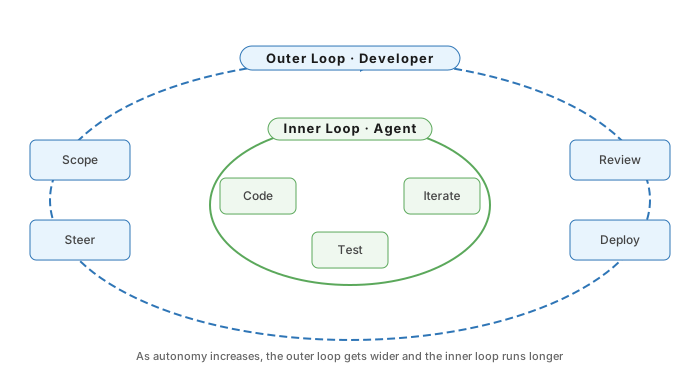
If you’ve been following the discourse around AI coding tools, you’ve probably encountered the terms “inner loop” and “outer loop.” Fair warning: these terms are overloaded. In the cloud-native world they mean local dev vs. CI/CD. In Kim and Yegge’s Vibe Coding framework they describe three timescales of AI collaboration. In the agentic world they describe the agent’s reasoning cycle vs. the verification wrapper around it.
For this post, I’ll use the simplest version: the inner loop is what the AI agent is doing — writing code, running tests, iterating on implementation. The outer loop is what the developer is doing — watching the plan, steering decisions, adjusting course, and deciding when the work is done. The interesting question is how tightly coupled those two loops are.
That coupling isn’t binary. It’s a spectrum of autonomy, and the right position depends on what you’re building, how well you understand it, and how much risk you’re willing to absorb. Over the past several months building real projects with AI agents, I’ve landed on a four-mode framework: Assistive, Directed, Autonomous, and Continuous. As you move across the spectrum, the developer’s outer loop gets wider — from watching every keystroke to checking in on finished PRs — and the agent’s inner loop gets longer and more independent.
The Spectrum
Assistive: The Hand Saw
Assistive AI is what most developers think of when they think of AI coding tools. You’re in your IDE with completions, chat, maybe a small agent. You’re at the wheel. You accept or reject every suggestion.
This is the mode with the highest human understanding and the lowest risk. It’s also the slowest — the bottleneck is still your typing speed. But that’s the point. Assistive mode is best when you need to hold context: unfamiliar codebases, security-critical systems, new concepts, or legacy systems where the domain language is poorly defined.
If explaining the change to an AI and iterating in a tight loop of small changeset prompts or you are using autocomplete, you’re in Assistive territory.
Directed: The Jigsaw
Directed AI is where things get interesting. You’re still in the IDE, but the agent has more control. You describe a feature in natural language and let the agent create or modify multiple files. It’s pair programming, except your pair types at machine speed.
I reach for Directed mode when I can explain the code faster than I can write it. Writing tests for a module, bootstrapping a component from an existing pattern, fixing a failing test where the error message tells you most of the story — these are directed tasks. You’re still reviewing every change, but the agent is doing the typing.
The risk is partial loss of context. When the agent writes three files you didn’t, you need the discipline to actually review them. Misunderstandings propagate across files, and the agent won’t tell you it made a subtle architectural choice you’d disagree with.
Autonomous: The Table Saw
Autonomous AI is where the developer steps out of the IDE entirely. You write an issue — clear scope, affected files, types to use, acceptance criteria — and assign it to an agent. The agent opens a PR. You review, leave comments, the agent iterates. You might never open the files locally until the final review.
This mode is powerful for the right tasks: boilerplate, common patterns, simple CRUD pages, well-scoped bug fixes, or anything where the pattern is well-established and you just need another instance of it. It’s also great for “long shot” tasks — kick off an agent on a tricky bug, and even if it only gets 60% of the way there, you’ve saved yourself the first hour of investigation.
There’s an even more ambitious version of Autonomous that I’ve been spending more time with lately, built from two complementary practices. The first is spec-driven development: you write a detailed spec file, run it through a planning phase with one or more thinking models, and hand the agent a blueprint to execute against. The second is autonomous looping — methods like Ralph Wiggum Mode, Gas Town, and others where the agent keeps iterating on a task, self-checking and course-correcting, until it verifiably completes the work. Several approaches have emerged here, each with different opinions on loop control, context management, and verification — but the core idea is the same: don’t let the agent stop until the job is actually done.
These are independent but powerfully complementary. A good spec gives the loop direction; the loop gives the spec execution. Together, they feel like the first 3D printer for code. You design the model, feed it the spec, and let it run. It’s remarkably capable — and sometimes you get spaghetti monsters. But failed prints are cheap. Refine the spec, adjust the plan, try again.
The real risk at this level is complacency. Code arrives as a full PR, and there’s a psychological temptation to review it less critically than code you watched being written. Volume can create rubber-stamping. I’ve caught myself approving PRs too quickly when several agent-generated ones were stacked up, the rigor of review of course needs to consider the risk of the change.
Continuous: The Chainsaw
Continuous AI is the newest and least understood mode, but it might be the most transformative. AI operates like a background service on your repository — running automatically in response to events, schedules, or triggers, without waiting for a developer to invoke it.
GitHub Next has been exploring this under the label “Continuous AI”, drawing a deliberate parallel to CI/CD. They expect it to be a story that runs for 30+ years, and I think they’re right.
Peli’s Agent Factory gives us a glimpse of what this looks like at scale. The GitHub Next team built and operated over 100 automated agentic workflows on a single repository — agents that triage issues, diagnose CI failures, maintain documentation, improve test coverage, monitor security compliance, and even write poetry to boost team morale. Some are read-only analysts. Others proactively open pull requests. Some are meta-agents that monitor the health of other workflows.
Good Continuous AI tasks are automatable, repetitive, event-triggered, and auditable. Think: continuous documentation, continuous triage, continuous fault analysis, continuous accessibility checks. If you want to try this, GitHub Agentic Workflows provides a way to create these workflows using natural language and GitHub Actions, with scoped permissions and guardrails built in.
The risks are architectural drift and trust calibration. If continuous agents are making hundreds of small changes, how do you ensure they’re not slowly steering the codebase somewhere nobody intended? Meta-agents help. Strong guardrails, observability, and rollback infrastructure are essential. This mode requires thinking about AI governance, not just AI productivity.
How This Actually Works
I recently built an internal admin tool at GitHub for monitoring AI model deployments. Well-defined data types, a known set of pages, low risk (internal only, read-only to start), and one part-time developer — me — who hadn’t built a large UI project in two years.
The interesting thing wasn’t that I used AI. It was how I moved between modes, often on a single change.
The project started Autonomous. I set up the initial architecture via GitHub Issues assigned to Copilot — Go server, React frontend, Vite build system. These are very common patterns, and the agent can be trusted to make good decisions here.
For the first few features, I moved back to Directed and Assistive to be more hands-on, establishing the patterns and conventions the rest of the project would follow. This allowed me to think with the agent and guide its decisions. I could have used this time to develop specs as well but chose to be hands on as this fits my thinking modes better. Once those patterns were solid, subsequent features went Autonomous again. The agent could see the established patterns and replicate them. Continuous AI ran throughout — documentation, accessibility, dependency patching, CI fixes.
It’s common to switch modes two or three times on a single change. That’s not a failure — it’s the process working as designed. You should be choosing modes based on what is fastest for your workflow. You open an issue for the agent, it takes a first pass (running tests and linters as part of its own inner loop), you pull it locally and test, redirect via comments, review for security and architectural fit, then drop into Assistive or Directed mode to fix final issues. The whole project, a large admin view over model deployment tooling (think terraform), was built and deployed in about three weeks without blocking my other work.
The Tradeoffs
| Mode | Human Understanding | Risk of Incorrect Implementation | Review Burden | Leverage (Speed/Scale) |
|---|---|---|---|---|
| Assistive | ★★★★★ | ★ | ★ | ★ |
| Directed | ★★★★ | ★★ | ★★ | ★★★ |
| Autonomous | ★★★ | ★★★ | ★★★ | ★★★★ |
| Autonomous + Spec | ★★★ | ★★ | ★★★ | ★★★★ |
| Continuous | ★★ | ★★★★ | ★★★★ | ★★★★★ |
As autonomy increases, so does leverage — but human understanding decreases and risk increases. Every jump up the ladder trades understanding for speed. Would you fly in a vibe coded airplane? The answer tells you where on the spectrum your current task belongs.
Notice the extra row. Spec-driven development meaningfully reduces risk in Autonomous mode. Thoughtworks found that structured specifications reduce hallucinations and improve LLM reasoning. Red Hat’s analysis found that spec + lessons-learned feedback loops reduce agent errors over time. And Martin Fowler’s team observed that lower-abstraction specs reduce the interpretive steps an LLM must take, and therefore the chance of errors. My own experience backs this up — agents with good specs produce meaningfully better results than agents without them.
I want to be honest about the limits here, though. Writing good specs is still black magic. There’s no reliable formula. Specs are all over the place in terms of format, abstraction level, and what to include. LLMs are non-deterministic, so the same spec can produce different results on different runs. The evidence for why specs help is largely anecdotal and qualitative — we don’t yet have rigorous studies measuring first-pass success rates with and without specs on identical tasks. I’m confident specs reduce risk. I’m less confident anyone can tell you exactly how to write one well, including me.
Code Is Getting Cheaper
There’s a broader shift underneath all of this: the cost of writing code is dropping fast.
When implementation is expensive, the optimal strategy is to get it right the first time. When implementation is cheap, you can generate multiple versions and pick the best one. Let three agents take different approaches and compare results. Throw away an implementation and retry with a better spec, because the cost is minutes and tokens, not days and morale.
This changes where risk regulation lives. Historically, code review caught everything — correctness, security, style, architecture. When AI generates significant volumes of code, reviewing line-by-line for correctness doesn’t scale. Automated systems are better at it anyway. Tests verify behavior. Type checkers verify contracts. Linters enforce style. CI runs the suite on every push.
What humans are uniquely good at — and what review should increasingly focus on — is judgment: security implications, compliance, architectural fit, and whether the change aligns with the quality attributes the team has agreed matter most. Code review isn’t less important. It’s differently important. Tools absorb the correctness burden; human review becomes the quality and governance layer. In a world where code is cheap, judgment is the expensive thing.
The Art of Picking Modes
There’s a METR study that found developers using AI tools took 19% longer to complete tasks — while believing AI had sped them up by 20%. The gap between perception and reality was striking.
I think this is worth taking seriously without taking it as the final word. Controlled studies don’t capture the compounding effects of AI on a real project over weeks — the boilerplate you never wrote, the patterns established faster, the features built because the cost dropped enough to justify them.
But the study highlights something I’ve experienced firsthand: picking the right mode is an art, and getting it wrong is expensive.
Staying in a single mode all the time will slow you down. A single line of code is faster to change by hand than to describe to an agent. Some things are genuinely harder to explain than to code — you’ll spend ten minutes crafting a prompt for something you could’ve typed in thirty seconds. And sometimes you don’t know how to explain what you want until you start writing the code yourself. I’ve watched myself spin my wheels trying to articulate a change to an agent when writing the code would have clarified my thinking far faster.
The inverse is equally true. Hand-typing a hundred lines of boilerplate when a directed agent can generate it in seconds is a waste. The developers in the METR study may have been slower precisely because they reached for AI on tasks where it wasn’t the right tool, and didn’t switch when it wasn’t working.
This fluency — the ability to shift between modes mid-task based on what the work actually needs — is what separates productive AI-assisted development from the feeling of productive AI-assisted development.
The framework described here emerged from building real projects with AI at GitHub. For a deep dive into autonomous looping, check out my post on Ralph Wiggum Mode.